 SpaceFix
Scan your Mac
See what is using storage in supported locations. Choose folder access when requested.
See what takes up space. Review your scan, then clean verified items in one click.
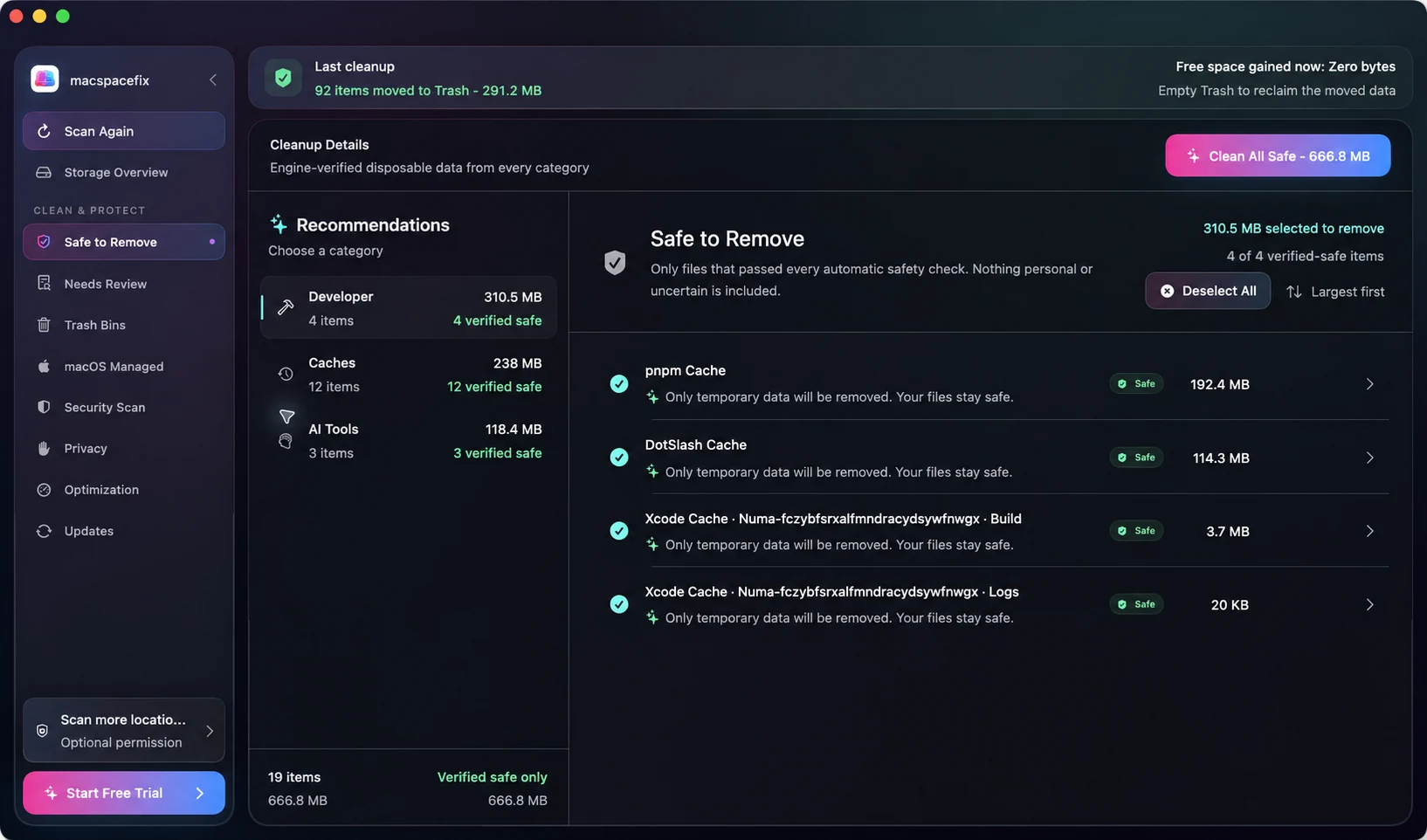
 Safe to Remove
One action for verified items.
After your scan and review.
Verified supported files ready for cleanup

Clear context before you decide

Review supported suspicious findings

Review apps that can affect startup
Bring supported cleanup together with Clean All Safe. You choose when to act. SpaceFix checks the eligible files again before they move to Trash.
See what is using storage in supported locations. Choose folder access when requested.
Verified disposable files stay separate from personal, uncertain, and protected data.
Start one cleanup action for verified items, following any app confirmation. Review Trash and rescan to verify space.
A scan and your review come first. Try the preview to see the cleanup checks.
When your Mac storage is full, caches, developer files, app data, and macOS-managed storage can be hard to separate. SpaceFix turns the supported areas it can inspect into a clear breakdown.
01 / SAFE TO REMOVEAfter a scan and review, use Clean All Safe for supported disposable files. Fresh checks run before eligible items move to Trash. Follow any confirmation shown in the app.
02 / NEEDS REVIEWSpaceFix keeps meaningful or uncertain storage out of automatic cleanup and gives you context before you decide.
 03 / STORAGE
Understand what is taking up space on your Mac without confusing storage in use with space that is safe to reclaim.
04 / SECURITYSpaceFix performs focused checks for supported suspicious findings. Review the coverage and every finding.
05 / OPTIMIZATIONReview apps that can affect startup. Understand supported startup and login items before making changes.
Understand what is taking up space on your Mac without confusing storage in use with space that is safe to reclaim.
Review supported Xcode, Codex, Claude, Cursor, package-manager, cache, log, temporary, and generated data. Verified rebuildable items can be separated from data that needs review or must stay protected.

Past sessions, logs, and activity data that can grow over time.

Rebuildable files created to make tools load and run faster.

Short-term working files that may no longer be needed.

Generated files from builds, indexes, and compiled output.
SpaceFix helps you see what is using space, distinguish supported cleanup from files that deserve review, and keep protected storage clearly separate. One straightforward plan for one Mac—no tiers or per-scan charges.
Full access from day one.
Download on the Mac App Store7 days free, then $3.99/month.
Renews automatically unless cancelled.
“I did not want another app that simply shouted ‘junk found.’ I wanted to know where my storage went and what I could remove without damaging the things I actually care about.”Hocains Founder, SpaceFix
START HEREFree up space on your Mac with a clear review-first workflow. Check storage, separate cleanup candidates, and verify what changed after moving files to Trash.
Read the guide ↗SYSTEM DATAUnderstand why System Data can take up space on your Mac. Learn what to review, what should stay protected, and how SpaceFix explains supported storage.
Read the guide ↗CACHE CLEANUPUnderstand cache cleanup on Mac. Identify supported disposable files, keep personal data separate, and use SpaceFix to review cache cleanup before acting.
Read the guide ↗Your scan stays on your Mac. Read the privacy policy.
Cleanup requires your action. Personal and uncertain items stay separate.
7 days free for eligible users, then $3.99/month. Apple shows local pricing and final terms.
SpaceFix is a Mac storage analyzer and cleaner. It organizes supported storage into verified safe-to-remove, needs-review, and protected or macOS-managed categories.
No. Cleanup requires your action. Supported cleanup items are verified again and moved to macOS Trash rather than permanently erased.
Verified supported caches, logs, temporary files, application leftovers, and selected developer-tool data may qualify. A cache is never considered safe merely because it is a cache.
Personal, ambiguous, and protected data does not enter automatic Safe to Remove. Items that may matter remain in Needs Review or protected categories.
macOS can group caches, developer files, temporary working data, and protected system storage under System Data. SpaceFix explains supported sources it can measure, but does not promise to delete all System Data.
No. It performs focused checks for supported suspicious findings. macOS XProtect and Gatekeeper remain the primary malware defenses.
$3.99/month for one active Mac after a 7-day free trial. The subscription renews automatically unless cancelled.
No SpaceFix account is required for the Mac App Store version. Apple handles the purchase and subscription through your Apple Account.
The current project targets macOS 13 Ventura and later.
Scan and review first. Then bring supported cleanup together.